Showing posts with label Error. Show all posts

Unable to start debugging on the web server. Unable to connect to the web server. Verify that the web server is running and that incoming HTTP requests are not blocked by a firewall.

One of the very common error message you will get when you try to run or debug your ASP.NET web application or website.

Unable to start debugging on the web server. Unable to connect to the web server. Verify that the web server is running and that incoming HTTP requests are not blocked by a firewall.

One can check following items on his development environment:

Error 118 The name '' does not exist in the current context

One of the common mistake :

Sometimes when you copy code files from other places, or copy it from some other solution ;) .

Check your code behind file name, Name space and Inherits property in the @Page directive.
Make sure they are equal.


By

Microsoft SharePoint is not supported with version 4.0.30319.239 of the Microsoft .Net Runtime

Whenever you face an error
"Microsoft SharePoint is not supported with version 4.0.30319.239 of the Microsoft .Net Runtime".
Refer the following items:

Cause Of Error:
All server-side customizations directly for SharePoint 2010 need to be either the .NET Framework 3.5 or the .NET Framework 3.5 SP1. SharePoint 2010 doesn't support access from .NET Framework 4 or being run in a .NET Framework 4 app domain. When you try to run any update made in .NET Framework 4.0 or higher, you will face this error.

Solution:

Min (10) must be less than or equal to max (-1) in a Range object.

During the development of using Visual Studio, I got the below error:

"Min (10) must be less than or equal to max (-1) in a Range object."

I have resolved the issue with the help of MSDN but still I would like to share the link that helped me to resolve the  issue.

Below is the link:

Could not load file or assembly 'AjaxControlToolkit' or one of its dependencies. The parameter is incorrect. (Exception from HRESULT: 0x80070057 (E_INVALIDARG)) [Updated]

The title of this post is common error for .net developers. Sometimes, when you try to run your project, you may get this error

Could not load file or assembly 'AjaxControlToolkit' or one of its dependencies. The parameter is incorrect. (Exception from HRESULT: 0x80070057 (E_INVALIDARG))

There is a number of blog posts available on different websites. I have clubbed them here for quick view. Follow them step by step, that may resolve the issue.

ALTER DATABASE failed because a lock could not be placed on database 'linkoblast_DB'. Try again later. Msg 5069, Level 16, State 1, Line 4 ALTER DATABASE statement failed.

Sometimes when you try to take your database offline. As soon as you run the process, you may face issue with following error message:

ALTER DATABASE failed because a lock could not be placed on database 'linkoblast_DB'. Try again later.

Msg 5069, Level 16, State 1, Line 4 ALTER DATABASE statement failed.

Below is the simple solution to this error message:

An unknown error occurred while processing the request on the server. The status code returned from the server was: 500

Whenever you face the below error message
An unknown error occurred while processing the request on the server. The status code returned from the server was: 500
you can follow the steps and update you code files to come out from the error

The file 'Default.aspx.cs' does not exist.


In an ASP.NET project, when you compile your project it shows message "Rebuild Succeeded".

As soon as you run your project you may encounter and error message that says
The file 'Default.aspx.cs' does not exist.
How is it possible, your compilation was successfull and a .cs file is missing :)
Below is the solution that you can look into:

SQL Server: Saving changes is not permitted

In MS SQL Server 2008 Management Studio, when you go and edit structure of an table you may hit head with following error:

Saving changes is not permitted. The changes you have made require the following tables to be dropped and re-created. You have either made changes to a table that can't be re-created or enabled the option Prevent saving changes that require the table to be re-created.
I found a simple solution for this error.

The content type name 'linkoblast' cannot contain: \ / : * ? " # % < > { } | ~ & , two consecutive periods (..), or special characters such as a tab.

I was developing a content type in SharePoint 2010. Everything was good till I entered details in my Form. But it went wrong after I pressed "Create" button.

I got a strange error message as displayed below:
Microsoft.SharePoint.SPInvalidContentTypeNameException: The content type name 'Linkoblast\AddressBook' cannot contain: \  / : * ? " # % &amp;amp;lt; &amp;amp;gt; { } | ~ &amp;amp;amp; , two consecutive periods (..), or special characters such as a tab.

SQL Server : Executing the query "CREATE TABLE [dbo].[###] (Column 0] v..." failed with the following error: "There is already an object named '###' in the database.". Possible failure reasons: Problems with the query, "ResultSet" property not set correctly, parameters not set correctly, or connection not established correctly

When I was Importing data from a flat file, I met with the below error:
Error 0xc002f210: Preparation SQL Task 1: Executing the query "CREATE TABLE [dbo].[###] (
[Column 0] v..." failed with the following error: "There is already an object named '###' in the database.". Possible failure reasons: Problems with the query, "ResultSet" property not set correctly, parameters not set correctly, or connection not established correctly.
At very first sight, I couldn't understand. But after some investigation found the resolution.

The request failed. The underlying connection was closed: Could not establish trust relationship for the SSL/TLS secure channel.

When accessing any web service you may  face below error mesage:
The request failed. The underlying connection was closed: Could not establish trust relationship for the SSL/TLS secure channel.

This can be resolved by adding following code just before you access the Secure web service


ServicePointManager.ServerCertificateValidationCallback += delegate(object sender,
X509Certificate certificate,
X509Chain chain,
SslPolicyErrors sslPolicyErrors)
{
return true;
};


Click here to view the original link.

By

SQL SERVER - Login Failed for "NT-AUTHORITY\IUSER"

When your connection string has the words "Integrated Security=SSPI" and you try to access the database, you will get this error

Login Failed for "NT-AUTHORITY\IUSER".

Below are the steps to resolve the error:
  • Open your Microsoft SQL Server Management Studio
  • Connect to your SQL Server instance

Error ID 72e9 Error in resolving user ‘ABC’: System.DirectoryServices.DirectoryServicesCOMException (0x8007202B): A referral was returned from the server...

When you have used PeoplePicker conrol in SharePoint 2010,  you might get below error instead of the user from Active Directory Services:
Error ID 72e9 Error in resolving user ‘Alpesh’ : System.DirectoryServices.DirectoryServicesCOMException (0x8007202B): A referral was returned from the server...
I found a solution provided at Joel Jeffery's blog with following details
We had a weird problem at one of my customers the other day. They’d built a SharePoint 2010 farm with one web application and three site collections.
In two of the site collections, the PeoplePicker control allowed the users to select the correct folks from their Active Directory. However, for one site collection, only users that already exist in the User Information List

The type or namespace name 'Publishing' does not exist in the namespace 'Microsoft.SharePoint' (are you missing an assembly reference)

I was working to publish assembly reference in your SharePoint 2010 and faced the error message :
The type or namespace name 'Publishing' does not exist in the namespace 'Microsoft.SharePoint' (are you missing an assembly reference)

I did some Google and found this good solution link from Microsoft TechNet site.


Enable Remote Connection on SQL Server 2008 Express

Update to my earlier post "A network-related or instance-specific error occurred while establishing a
connection to SQL Server. ....
".

Now SQL Server 2008 Express doesn’t allow
remote connection on default installation as on SQL Server 2005
Express. So you have to enable it manually.

If
you’re trying to connect to SQL Server 2008 Express remotely without
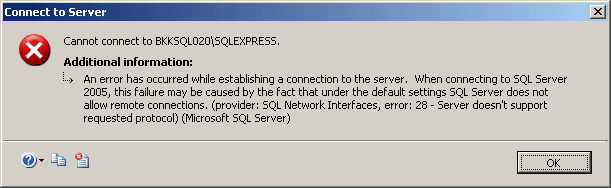
enable remote connection first, you may see these error messages:
  • “Cannot connect to SQL-Server-Instance-Name

    An error has occurred while establishing a connection to the server.
    When connecting to SQL Server 2005, this failure may be caused by the
    fact that under the default settings SQL Server does not allow remote
    connections. (provider: SQL Network Interfaces, error: 28 – Server
    doesn’t support requested protocol) (Microsoft SQL Server)”

  • Server doesn't support requested protocol

Saving changes is not permitted The changes you have made require the following tables to be dropped and re-created. - SQL Server 2008

When you try to change something in SQL Server 2008 related to table, you may encounter a dialog saying the following message
Saving changes is not permitted The changes you have made require the following tables to be dropped and re-created. You have either made changes to a table that can't be re-created or enabled the option Prevent saving changes that require the table to be re-created.

Normally, whenever I faced this message earlier, I used to do the change using SQL command, but today I found something interesting.

Here are the abstracts from that:

New default in SQL Server's Management Tools: When you design a table in
a database and then try to make a change to a table structure that
requires the table to be recreated, the management tools will not allow
you to save the changes. Instead you'll be greeted by this friendly
dialog:

Notice that there's no option to save the changes - it's a hard rule
that is applied upon saving and you can get past this other than back
out of the dialog.


ORDER BY items must appear in the select list if the statement contains a UNION, INTERSECT or EXCEPT operator.

In SQL Server, you may face an error and get the below error message:
Msg 104, Level 16, State 1, Line 4
ORDER BY items must appear in the select list if the statement contains a UNION, INTERSECT or EXCEPT operator.

Below is the solution of your query, make sure you have followed the pattern as below

Select * from
(               
            SELECT   field1, field2 FROM Table1 WHERE  field1 = 'abc'
            UNION
            SELECT   field1, field2 FROM Table2 WHERE  field2 = 'xyz'
) VarTable
                    order by case when field1 is not null then field1 else field2 end desc


Let us know your feedback.

Thank you Hiral Shah for this post!

By

The module ### was loaded but the call to DllRegisterServer failed with error code 0x80040201

When trying to register a DLL, i got the below error message

The module ### was loaded but the call to DllRegisterServer failed with error code 0x80040201


I have performed following steps and the error resolved

Start Menu / "Right Click Command prompt and select run as administrator"

Try to execute the DLL registration command "regsvr32 c:\.....\yourfile.dll"

* This solution is applicable to Windows Vista, Windows Server 2008 and Windows 7.
By

Could not start the World Wide Web Publishing Service service on the local computer

I just got an error message when trying to start "World Wide Web Publishing Service" in my computer.
Could not start the World Wide Web Publishing Service service on the local computer

Here is the screen shot for the same


I searched for the solution and found a best one.

Just Restarted my computer and the error is resolved.

The most common solution for Microsoft Windows :)