Showing posts with label MSSQL. Show all posts

SQL Server : How to produce zero without using any numbers using SQL query

Have you ever thought producing '0' ZERO with using any digit or number in your SQL query.

I came across a good trick to produce ZERO (0) without using any number in T SQL statement by Madhivanan.

If you have any idea about the same....lets know through your comments OR click here to view the original link.

If you find the above link useful, let us know your feedback, it will help us to improve our posting(s). or You can send your feedback linkOblast.
Report Broken Link

Enable Remote Connection on SQL Server 2008 Express

Update to my earlier post "A network-related or instance-specific error occurred while establishing a
connection to SQL Server. ....
".

Now SQL Server 2008 Express doesn’t allow
remote connection on default installation as on SQL Server 2005
Express. So you have to enable it manually.

If
you’re trying to connect to SQL Server 2008 Express remotely without
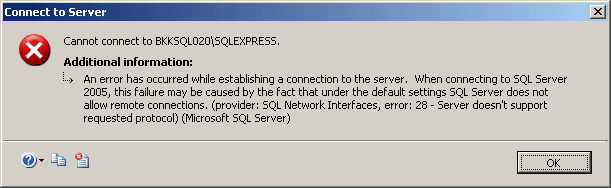
enable remote connection first, you may see these error messages:
  • “Cannot connect to SQL-Server-Instance-Name

    An error has occurred while establishing a connection to the server.
    When connecting to SQL Server 2005, this failure may be caused by the
    fact that under the default settings SQL Server does not allow remote
    connections. (provider: SQL Network Interfaces, error: 28 – Server
    doesn’t support requested protocol) (Microsoft SQL Server)”

  • Server doesn't support requested protocol

Rename a table in SQL

I ran to a problem today...I wanted to rename a table on the fly and use the new name in my queries.

I have found an useful command to rename a table in Microsoft SQL server.
The syntax and the command is as below:

exec sp_rename 'existing tablename' , 'new table name'
GO


Change Logical Filenames in SQL Server

I got a backup of a database from my co-worker, that i restored as "ABC" database.

It restored okay but when I check the logical named for both Data and Log file were "XYZ" and "XYZ_Log" respectively.

I just Googled for a solution and got a command to rename the logical files.

The command lines as below
    USE MASTER
    GO

    ALTER DATABASE DBName
    MODIFY FILE (NAME = ExistingLogicalDataFileName, NEWNAME='NewDataFileName')
    GO

    ALTER DATABASE DBName
    MODIFY FILE (NAME = ExistingLogicalLogFileName, NEWNAME=NewLogFileName)
    GO

If you want to visit the original article by Jon Galloway, click here


CountBusinessDays


A good functions that everyone can use to Calculate Business Days between two dates.

Click here to view the original link


Excerpts:

Working with Access, I needed to calculate business days between
dates, excluding holidays, and with an eventual conversion fo the DB to
SQL Server, rewrote the VBA into an SQL function, below:


set ANSI_NULLS ON

set QUOTED_IDENTIFIER ON

go


— =============================================

— Author: James Igoe

— Create date: 2008-08-29

— Description: Calculates business days between 2 dates

— =============================================

ALTER FUNCTION [dbo].[Fx_WorkdayCount]

(

@sStartDate As DATETIME,

@sEndDate As DATETIME

)

RETURNS SMALLINT

AS

BEGIN

— Declare the return variable here

DECLARE @BusinessDays SMALLINT


DECLARE @intDaysTotal As SMALLINT

DECLARE @intDaysWeeks As SMALLINT

DECLARE @intRemainder As SMALLINT

DECLARE @intRemainderPost As SMALLINT

DECLARE @intRemainderPre As SMALLINT


SET @intDaysTotal = DateDiff(day, @sEndDate, @sStartDate)

SET @intDaysWeeks = ((@intDaysTotal / 7) * 5)

SET @intRemainder = @intDaysTotal % 7


IF @intRemainderPre = 1

SET @intRemainder = @intRemainder - 1

ELSE IF @intRemainderPre = 7

SET @intRemainder = @intRemainder - 2


IF @intRemainderPost = 1

SET @intRemainder = @intRemainder - 1

ELSE IF @intRemainderPost = 7

SET @intRemainder = @intRemainder - 2


IF (@intRemainderPost < @intRemainderPre) And @intRemainderPre <> 7

SET @intRemainder = @intRemainder - 2


SQL Server Reporting Service

Wanna usa SQL Server Reporting service ?

Visit the following site :


http://msdn.microsoft.com/SQL/default.aspx?pull=/msdnmag/issues/04/08/sqlserverreportingservices/default.aspx

SQL Server Performance

Want to Increases performance in SQL Server Performance, click the link

http://www.sql-server-performance.com/reviews.asp

SQL Formatter

Online SQL Format helps you to format your query with proper indent

http://www.wangz.net/gsqlparser/sqlpp/sqlformat.htm